
Sponsored Content
This Futuristic Plugin Adds AI Culling to Lightroom Classic—Here’s How It Works

If you’re anything like me, then culling is a dreaded part of your photography workflow. After every shoot—whether it’s a wedding, a portrait session, or a landscape photography adventure —you’re left with a mountain of images to sort through.
And though Lightroom Classic is a fantastic tool for editing, it doesn’t make photo selection easy. You have to manually go through each and every image, flagging or rejecting, which is both tedious and time-consuming.
That’s where Excire Search 2026 changes everything. The latest version of Excire’s AI-powered Lightroom Classic plugin introduces dedicated culling tools that make photo selection faster, smarter, and infinitely less painful. Instead of slogging through each photo, Excire helps you cut straight to the good shots using AI-powered analysis and intelligent grouping.
In this article, I’ll show you exactly how Excire’s AI culling works and why it belongs in your workflow.
Let’s get started!
AI Culling in Lightroom With Excire Search 2026: The Basics
Excire’s new culling toolkit allows you to tackle massive shoots—up to 10,000 images in a single project!—in minutes (or even seconds). Everything happens inside Lightroom Classic via the Excire Search Panel, which offers easy access and an intuitive design.

To begin a culling project, you simply select the batch of images you want to review and press the Start/Adjust Culling Project button:
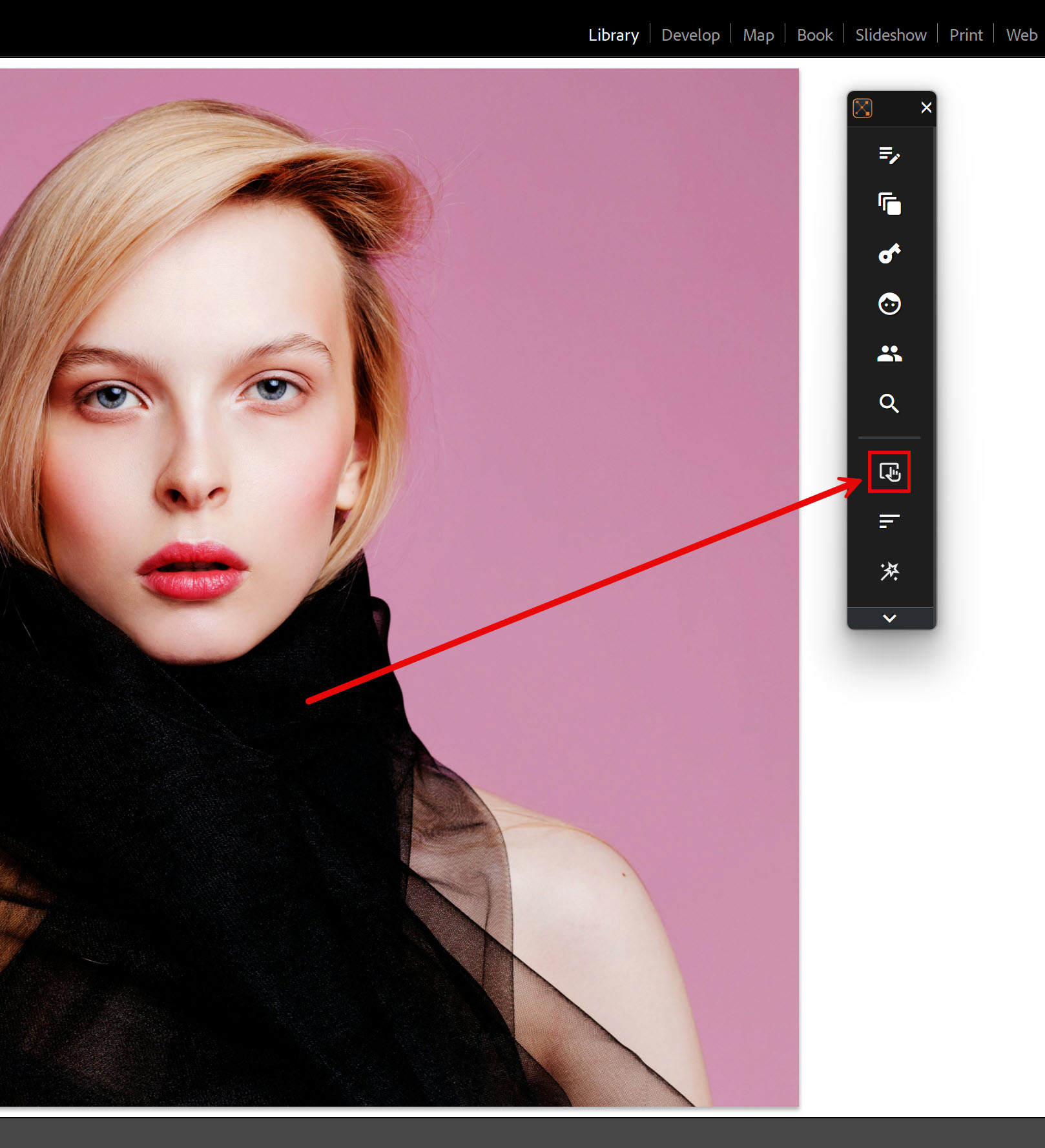
From there, Excire gives you a suite of flexible tools depending on what you want to achieve. Here are the core features:
Intelligent Image Rejection
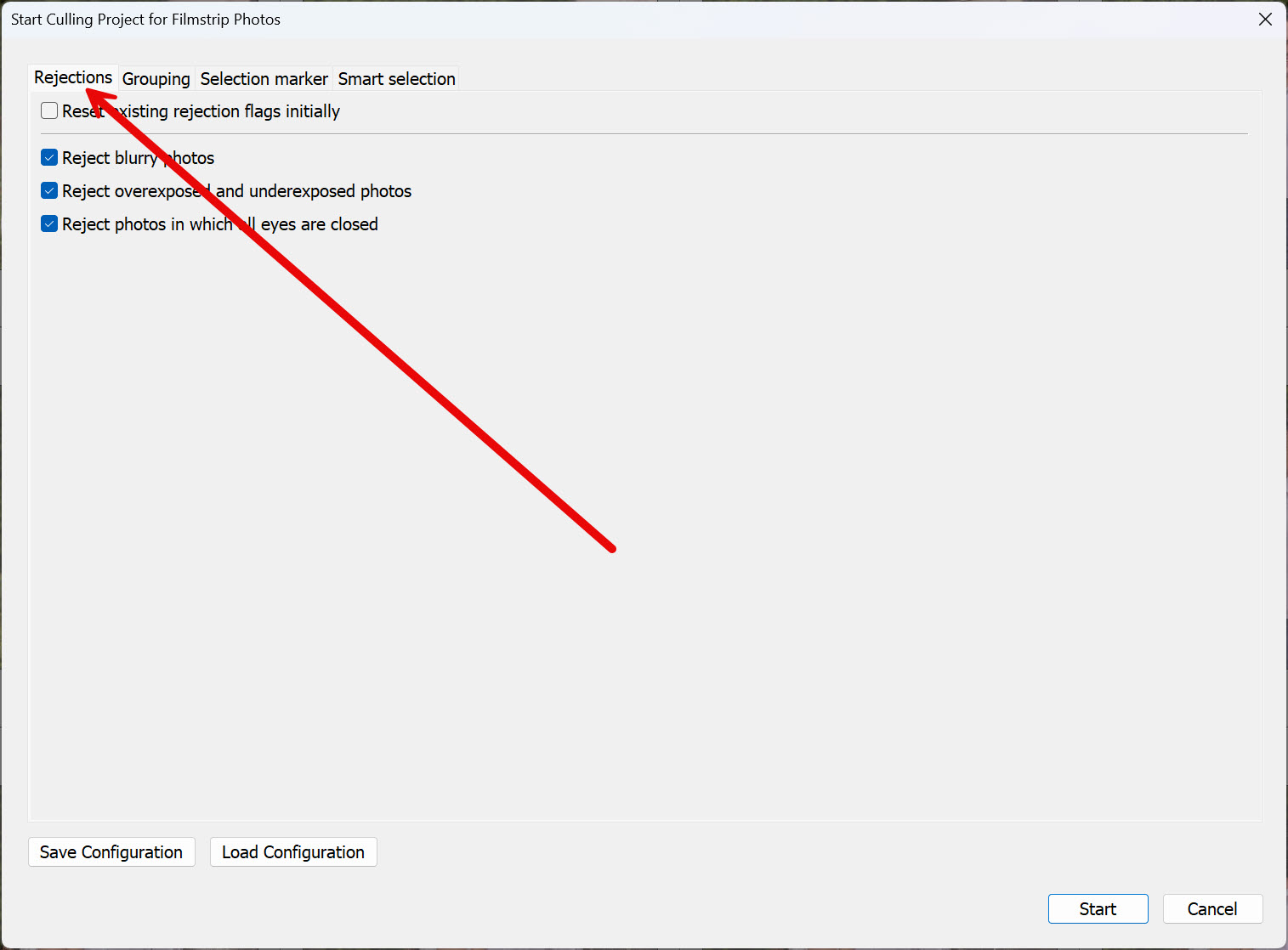
One time-saving culling feature in Excire Search 2026 is automatic rejection. Anyone who has shot an event knows the drill: plenty of shots are unusable due to technical flaws. Overexposed highlights, underexposed frames, soft focus, or subjects with their eyes closed—all of these issues eat up time during the review process.
Excire’s AI can handle this for you. You can tell Excire to reject images based on exposure, sharpness, and whether the subjects have closed eyes, and the plugin will do it in an instant.
Importantly, this process is non-destructive. Excire doesn’t delete anything; it simply marks the throwaway images in Lightroom with rejection flags.
Intelligent Image Grouping
Even if you rely on Excire to clear away the obvious rejects, the next challenge is managing volume. When you have hundreds or thousands of images, going through the remainder can feel overwhelming. Fortunately, Excire Search 2026 offers AI-powered image grouping, which breaks down your batch of images into logical, manageable chunks.
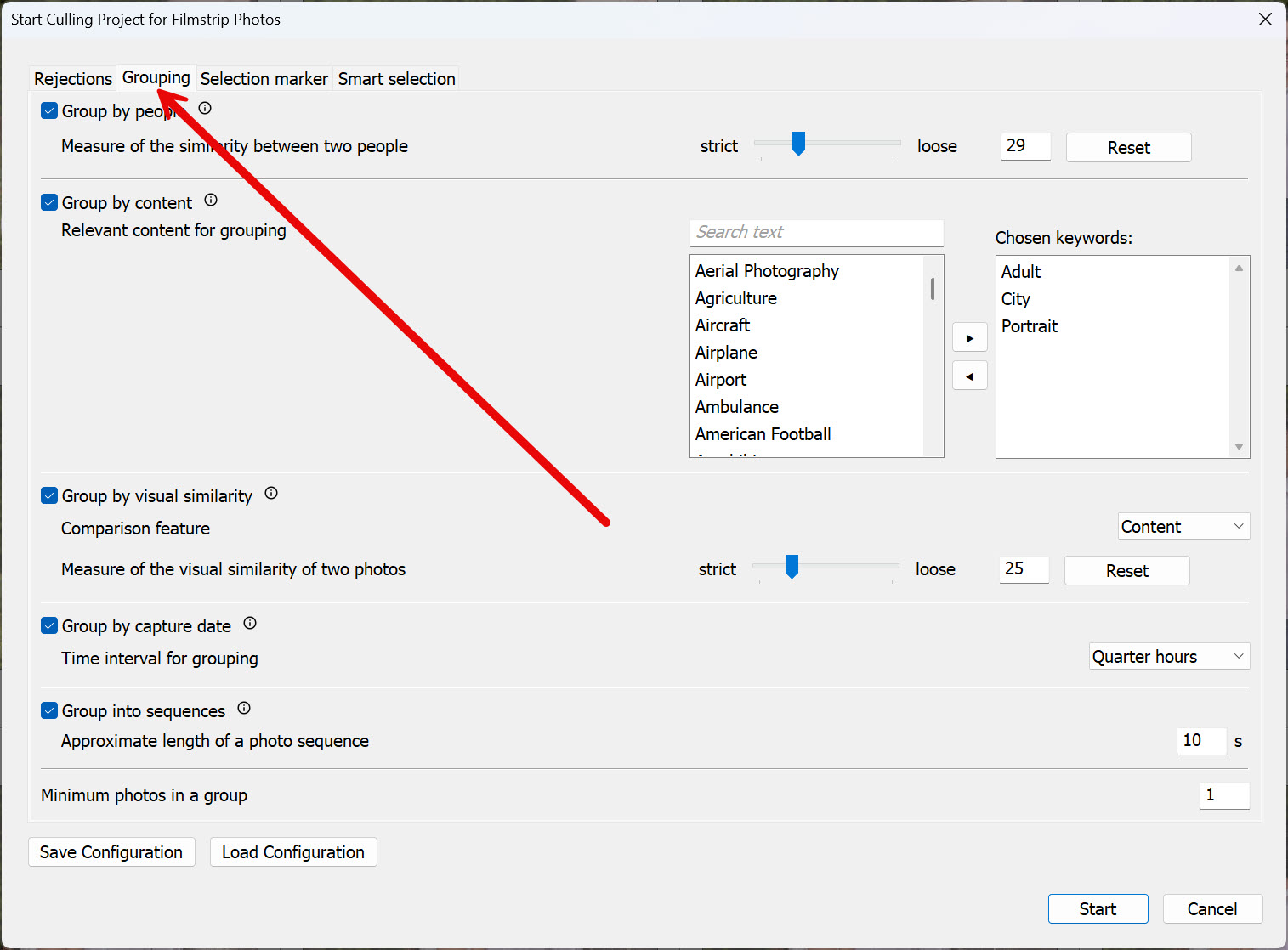
Specifically, you can group by:
People: Using advanced facial recognition, Excire identifies each person in your photos and creates groups for them.
Content: You can select from a lengthy list of keywords, and Excire will group the corresponding subject matter together.
Visual Similarity: Excire groups similar-looking images together so you can rapidly review sets of near-duplicates and quickly pick the best frame.
Capture Date: This grouping option allows you to select from a variety of time intervals. I like the quarter-hour interval, since it lets me view hour-long shoots in 15-minute chunks.
Sequences: Excire groups image bursts together, making it easy to review each sequence as a whole.
Now, these grouping options can be used together. I often like to run a Visual Similarity grouping and a Capture Date grouping for my travel shoots; that way, I can easily review sets of similar images, while also relying on the Capture Date grouping (often set to 15-minute intervals) to ensure that my entire batch of photos is well-represented from a storytelling perspective.
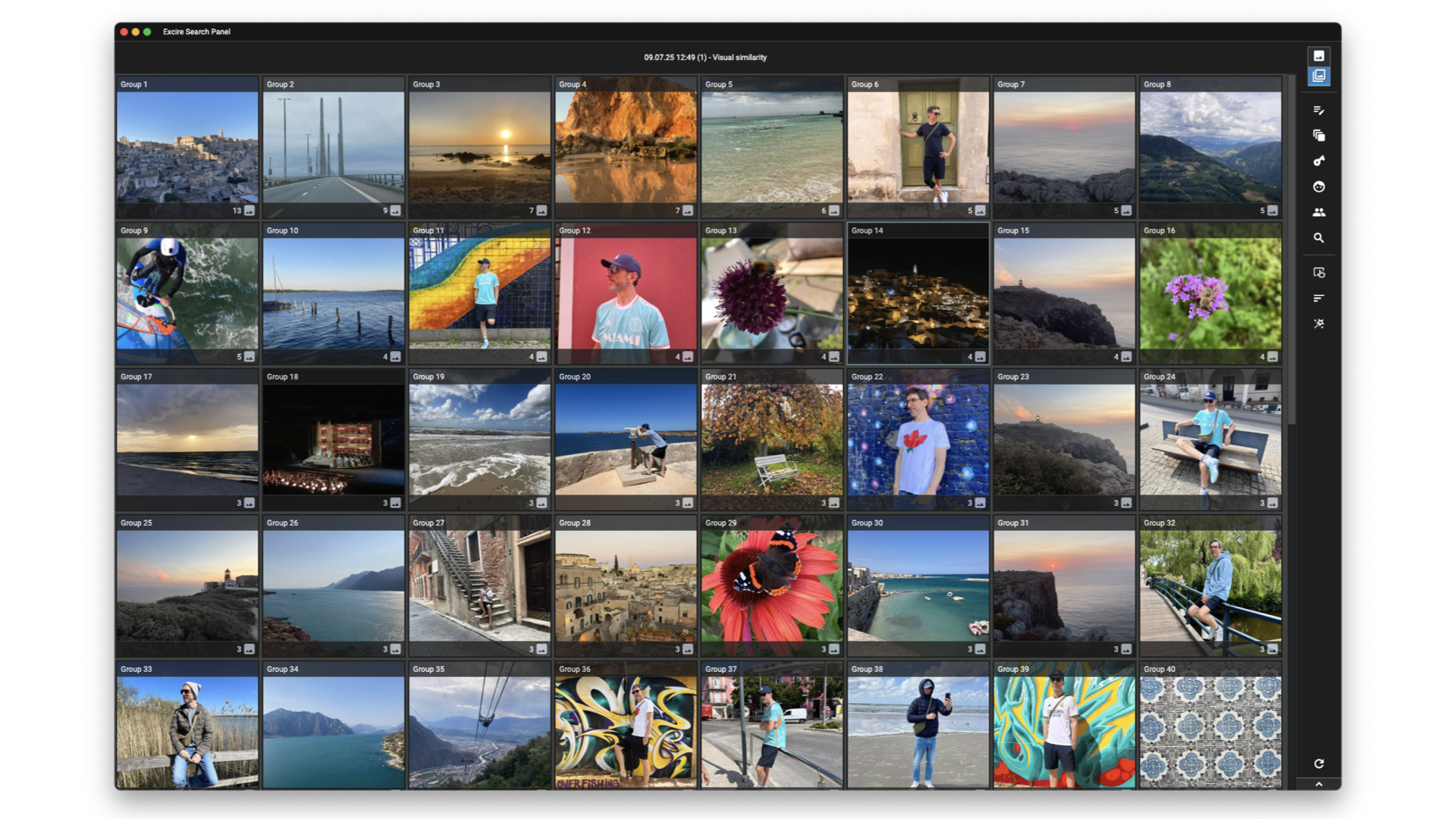
As with the intelligent rejection options (and all of Excire’s culling tools!), grouping is non-destructive. In fact, you can reconfigure the settings and re-run the grouping at any time. The groups appear both in the Excire Search Panel, which offers a streamlined interface designed for quick navigation:
And as Collections within Lightroom Classic, neatly organized in a culling collection set:
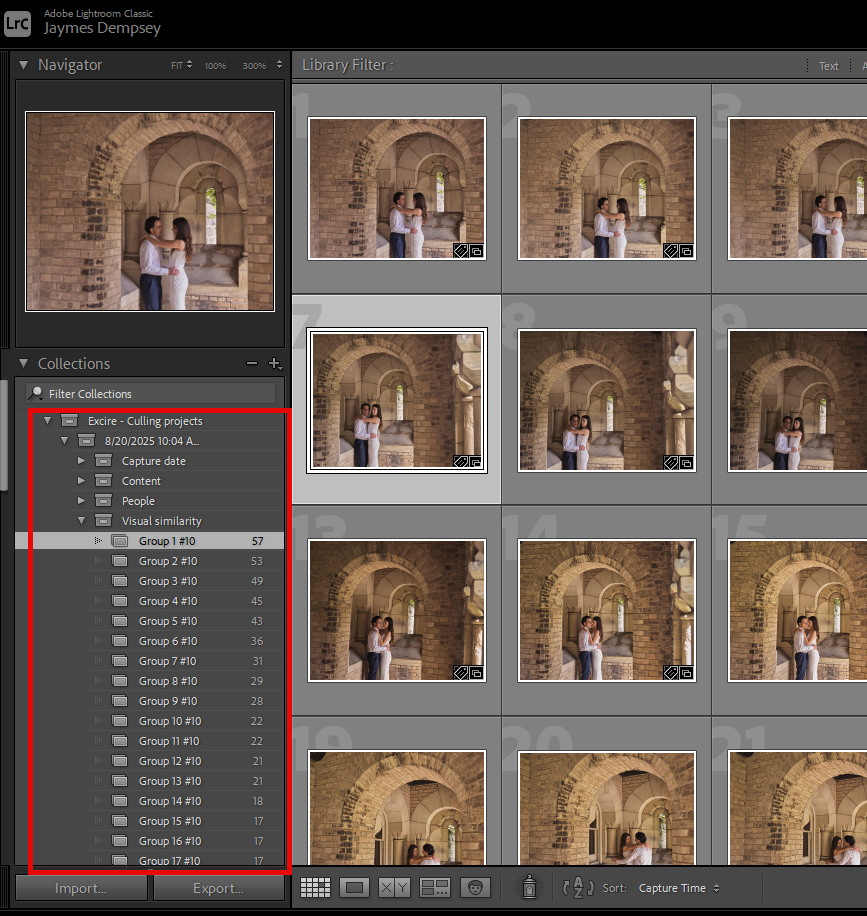
Which makes it easy to quickly review each group and select your favorites!
I’ll also add that the Excire Search Panel includes intelligent face-sharpness detection tools, so when you’re reviewing groups that include people, you can determine whether subjects’ eyes are sharp without zooming in.

Intelligent Image Sorting
Grouping makes a huge difference in managing large batches, but sometimes you don’t just want your images grouped—you want them ranked so the best rise to the top. That’s exactly what Excire’s automatic image sorting does.
Within any culling collection set, you can press the Sort button:
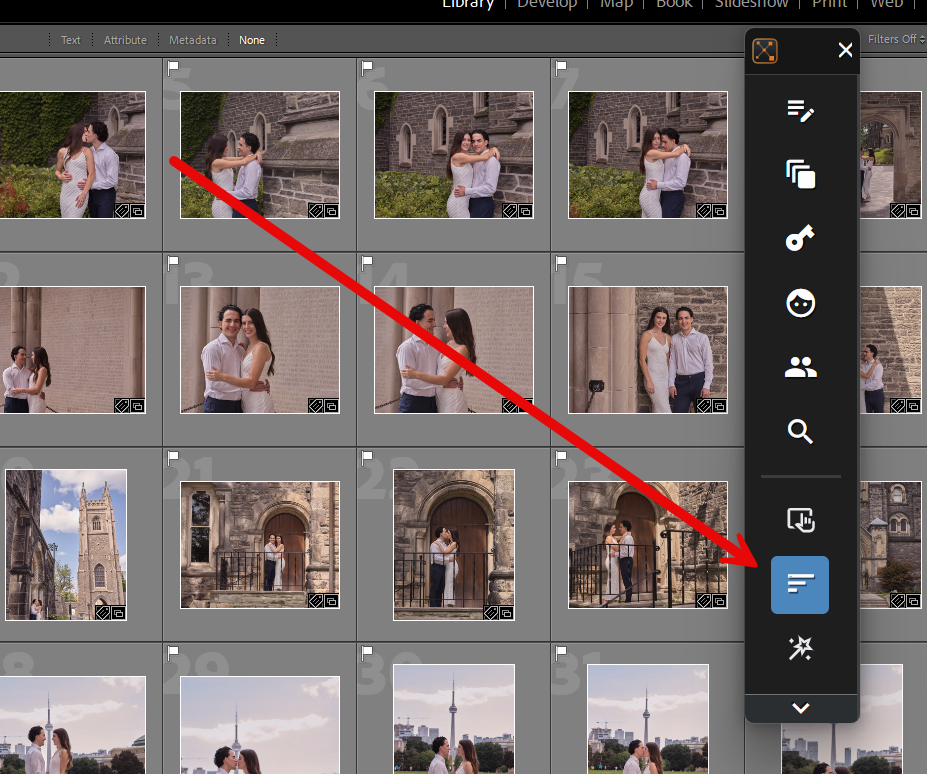
And select which qualities matter most to you:
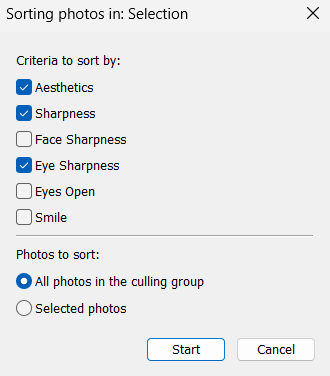
The available criteria include:
- Eye sharpness
- Face sharpness
- (Global) sharpness
- Aesthetics
- Eyes open
- Smile
Once you select your criteria, Excire will automatically reorder the image group so the strongest candidates appear first. That way, you can see the most promising frames from the get-go!
Automatic Smart Selection
For photographers who want to take things a step further, Excire Search 2026 introduces Smart Selection, a feature that can reduce a massive batch of images to a carefully curated set in seconds.
Instead of just grouping and sorting images, Smart Selection actually chooses the best ones from each group. Just click on the Smart Selection button:

And pick your criteria!
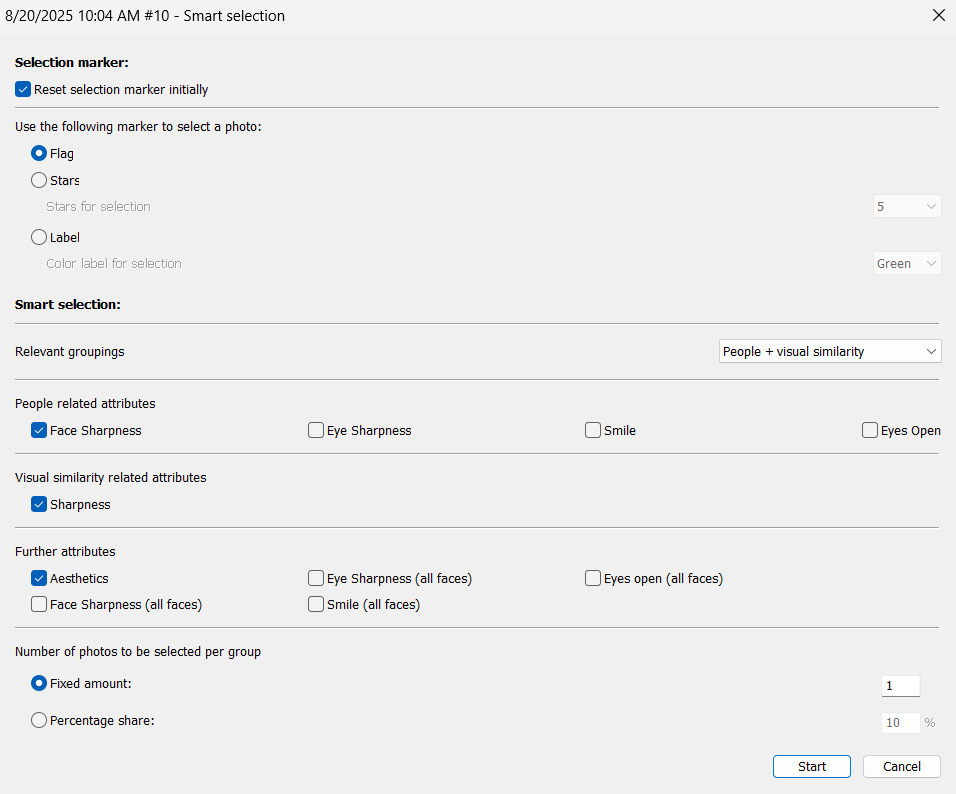
Note that while Excire selects the images, you get to decide which groupings should be used, how many images should be selected per group, and what standards they must meet. For example, you might tell Excire:
Pick the top two images from each People group, where the eyes are sharp, the subjects are smiling, and their eyes are open.
Excire will then go through your entire batch using this criteria. A thousand images can instantly become a manageable set of a hundred—or even fewer—high-quality shots.
Once again, as with every Excire culling tool, Smart Selection is completely non-destructive. Instead of deleting or permanently discarding anything, the plugin applies your chosen markers—flags, star ratings, or color labels—directly in Lightroom. You remain free to review and override its picks at any time.
This feature is especially powerful for high-volume shooters like wedding, event, or sports photographers. Rather than spending hours narrowing down thousands of frames, you can let Excire do the heavy lifting, then step in to review a refined shortlist.
Selection and Rejection Collections
Another benefit of Excire Search 2026: Selection and Rejection Collections are automatically built as part of every culling project.
Here’s how it works: Whenever you (or Excire’s AI) indicate a keeper photo, that image is automatically added to the Selection Collection in the culling project. No extra steps are required. This means all of your best photos live in a dedicated, easy-to-access “bucket” within the culling batch.

On the flip side, any images marked as rejected—either by you during manual review or by the AI’s automatic rejection feature—are gathered into a Rejection Collection. Again, everything is non-destructive. Your files remain in Lightroom, untouched, but you can view all the “no” shots in one place for quick batch deletion or archiving later.
This system of Selection and Rejection Collections is a small touch, but it keeps your Lightroom catalog organized during the culling process, reduces confusion, and helps you move efficiently from initial review to final delivery. That way, once you’re finished with your culling process, you can simply open your Selection Collection and get to work on the best of the best!
Time-Saving Culling Tools That Fit Your Workflow
A common hesitation when adopting new tools is the fear of disrupting your established workflow. After all, Lightroom Classic users have built systems and habits over years, and nobody wants to mess with a carefully created—if time-consuming—existing workflow.
The beauty of Excire Search 2026 is that it integrates directly into Lightroom Classic. There’s no need to switch software, no need to learn a completely new interface. The Excire Search plugin integrates seamlessly into Lightroom’s Library module, so the AI-powered culling tools feel like a natural extension of what you already do.
Plus, every culling action—whether it’s automatic rejection, grouping, smart selection, or sorting—results in collections and collection sets that exist within Lightroom. This means you can continue using Lightroom’s built-in tools, presets, and editing workflow without interruption.
I also want to emphasize:
Excire Search 2026 offers more than just culling. It’s a comprehensive photo-management plugin, so in addition to the photo-selection tools highlighted above, you’ll find advanced features like automatic AI keywording, prompt-search AI (type “dog on the beach at sunset” and find it instantly), facial recognition, duplicate search, aesthetic evaluations, and similarity search.
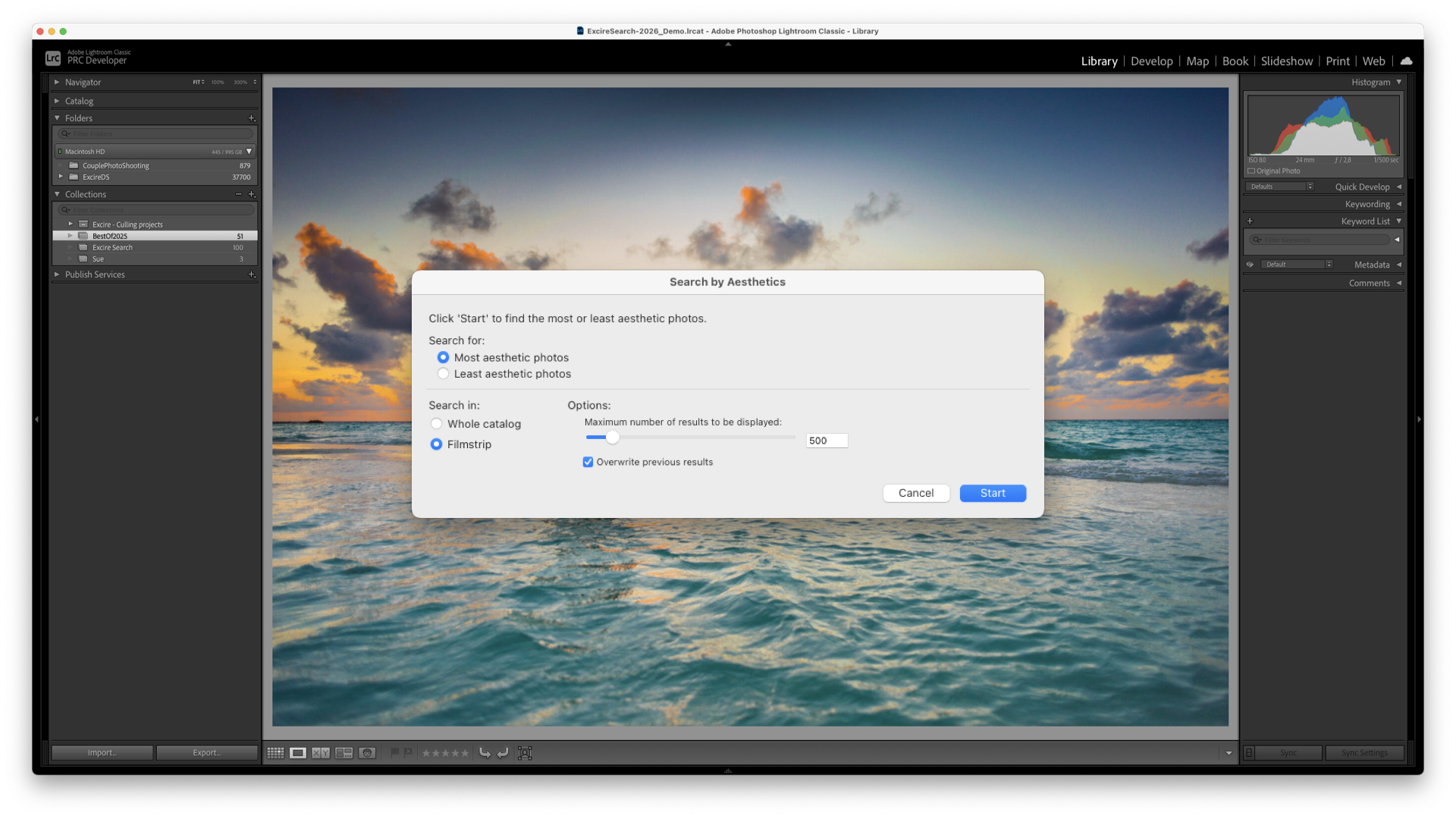
All of these are accessible through the Excire Search Panel, which can be expanded into a large workspace with preview capabilities:

Or collapsed into a slim quick-access strip that sits unobtrusively at the side of your Lightroom interface.
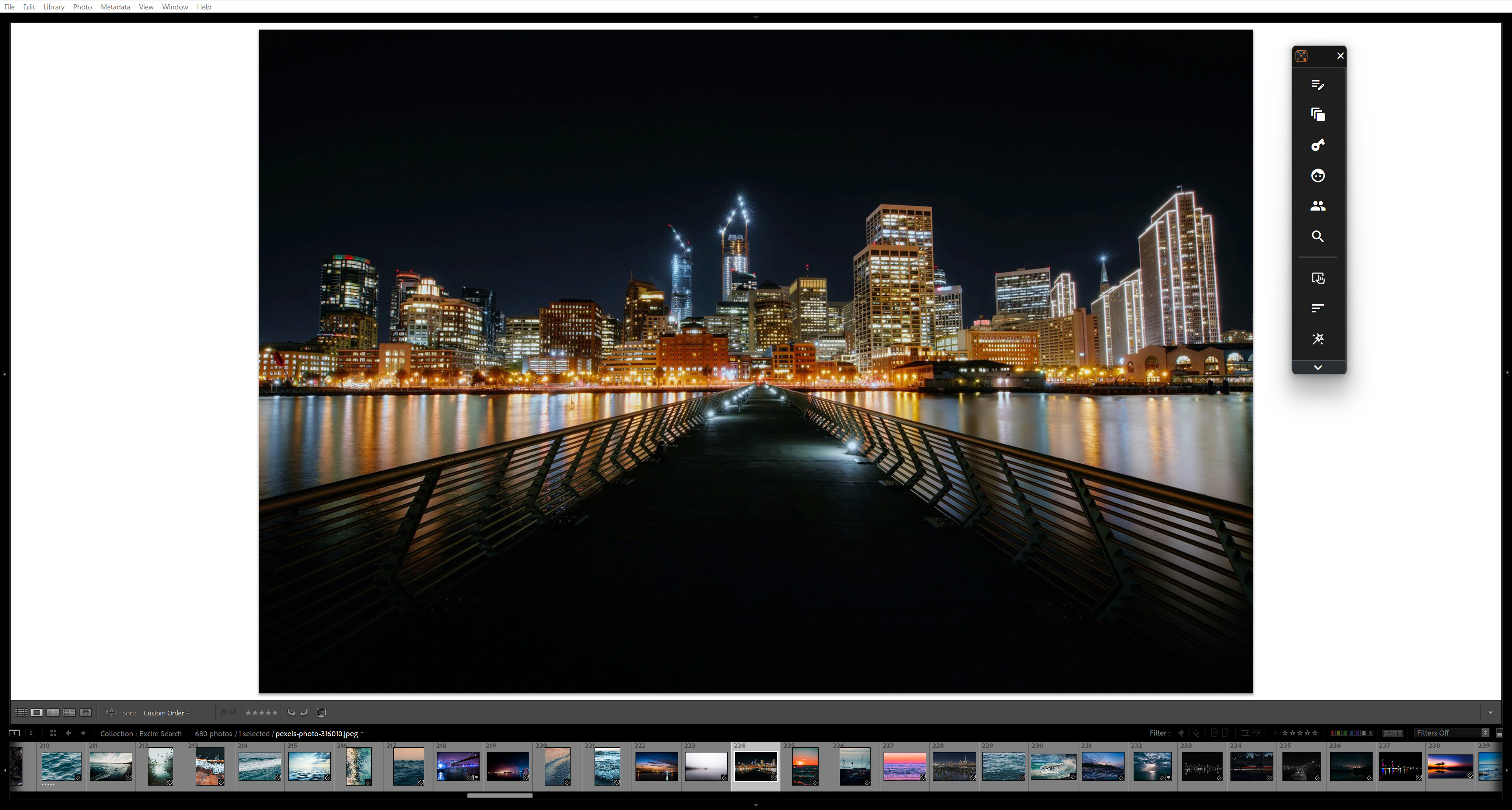
Bottom line: Excire Search 2026 elevates your entire Lightroom Classic experience. The plugin helps you maintain a clean, organized, and fully searchable catalog while eliminating hours of manual labor—all without ever leaving Lightroom.
Give the Excire Search 2026 Plugin a Try!
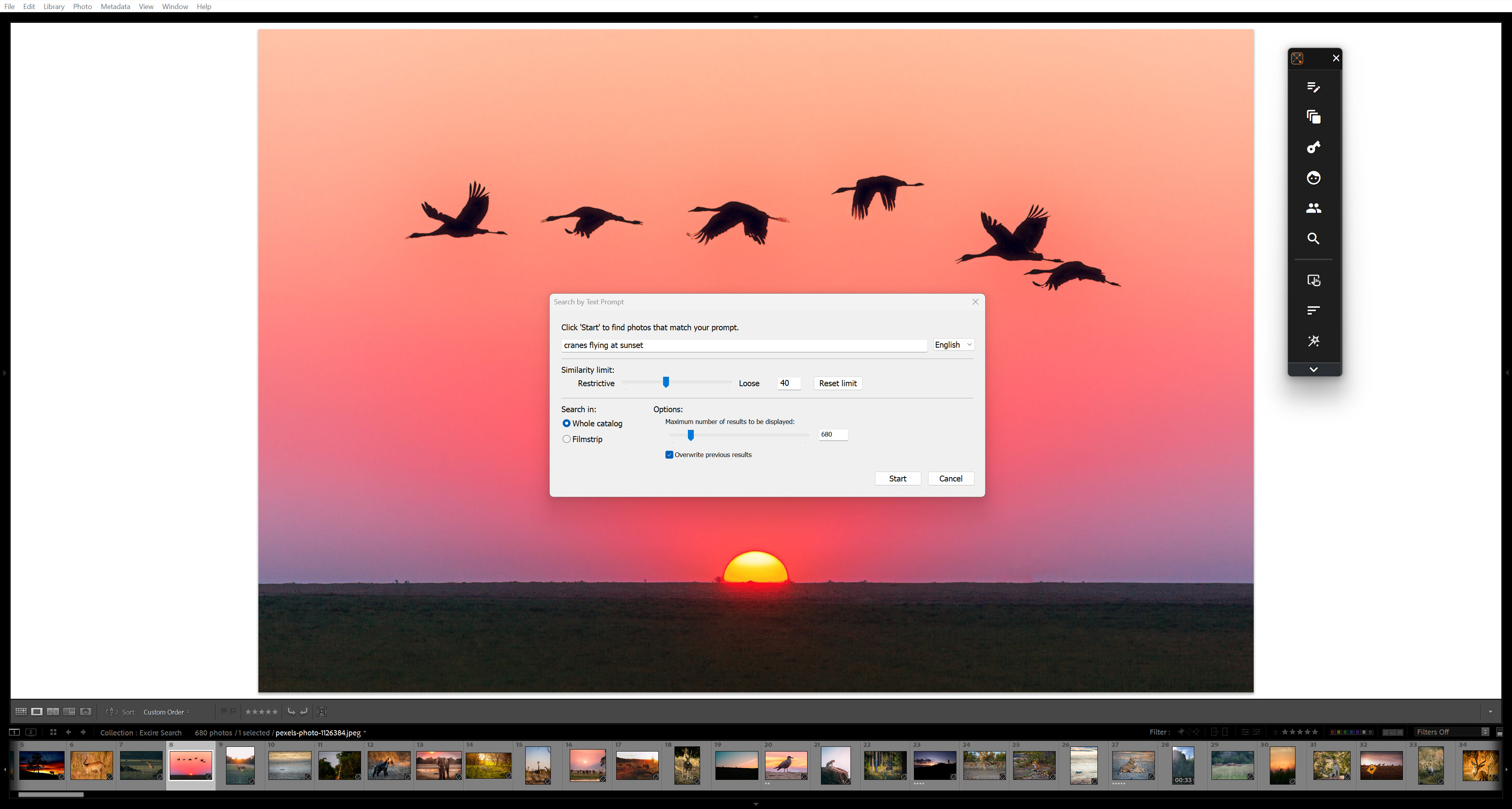
What used to feel like a never-ending slog of scrolling, zooming, flagging, and rejecting can now be streamlined into a process that takes minutes (or seconds) instead of hours. By bringing powerful AI culling directly into Lightroom Classic, Excire Search 2026 makes image selection not only manageable but even enjoyable. You can finally keep up with your catalog, stay organized, and focus your energy where it matters most.
And remember: Culling is just the beginning. Excire Search 2026 also includes advanced search and organization features like automatic keywording, similarity search, prompt search, facial recognition, and more, making it a truly all-in-one photo-management solution for Lightroom users.
So why not see the difference for yourself? Download the free 14-day trial of Excire Search 2026 and put the culling tools to the test on your own catalog. You’ll be amazed at how quickly you can go from thousands of shots to a polished set of keepers.
The Lightroom Classic plugin is available as a lifetime license, so you don’t need to worry about subscription costs. And since Excire runs locally on your computer, your data always remains safe and secure.
One final note: If you’re not a Lightroom Classic user, don’t worry; Excire also offers a standalone photo manager, called Excire Foto 2025, which provides the same AI-powered tools outside of Lightroom.
So try Excire Search 2026 for free and discover just how easy culling can be!